FlurryPixels – Playful Particle Animations for Rapidweaver Elements
Bring your websites to life – Living pixels for every season
FlurryPixels is a versatile particle animation component for Rapidweaver Elements that fills your pages with living, drifting, dancing pixels – from gentle snowfall to swirling storms. Choose from seven beautiful motion effects – Firefly, Falling, Storm, Blizzard, Drift, Parallax and Network – and combine them with dots, snowflakes or any custom character you like. Type 🍂 for autumn leaves, 🌸 for spring blossoms, ❤️ for Valentine's Day.h
One component, every season. The built-in seasonal scheduler shows each effect only in its date range – your snow appears in December and disappears in January, automatically. Add multiple instances and your website decorates itself all year round.
Want more motion, or just a brief moment of magic? Turn on Comet Trail for a soft glowing tail behind every pixel, or switch on Timed Playback to run the effect for a few seconds and fade it away automatically – perfect for a one-time welcome animation instead of nonstop motion.
Just pick an effect, drop it on your page, and publish.
Ten Selected Examples
Bouncing Fireflies
Parallax Text
Falling Hearts
Move with the mouse over the emojis and see the kinetic effect (not visible on touch devices)
Classic Snowfall
Blizzard
Autumn Leaves
Move with the mouse over the emojis and see the kinetic effect (not visible on touch devices)
Comets Are Coming
Matrix Rain
Black Friday
Network in Charge
Component Settings
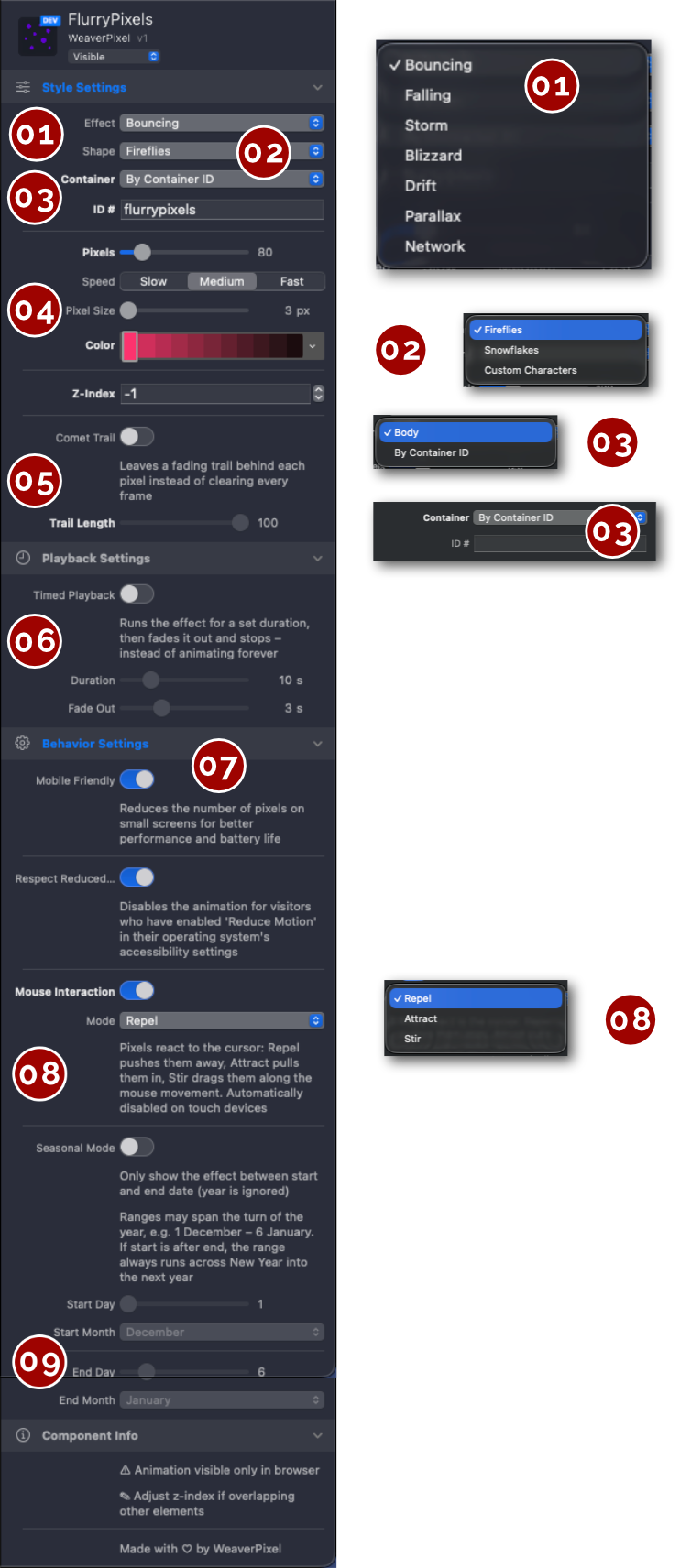
Effect: Choose how your pixels move. Bouncing drifts them gently around like fireflies, Falling and Storm let them rain down calm or wild, Blizzard adds strong sideways wind, Drift piles falling snow up at the bottom, Parallax adds depth with layers moving at different speeds, and Network connects nearby pixels with fading lines for a constellation-like look.
Shape: Pick what the pixels look like: simple glowing dots (Fireflies), rotating snowflakes – or choose Custom Characters and type any character or emoji. 🍂 for autumn, 🌸 for spring, ❤️ for Valentine's Day.
Container: By default the effect covers the whole page (Body). Choose "By Container ID" and enter the ID of any container to run the effect inside that section only – perfect for hero areas or cards. You can add multiple instances with different containers on one page.
We'd recommend keeping the container ID simple – good examples are "snowfall-01" or "sf-1". Use only letters, numbers and hyphens – no spaces or special characters.
Look and feel: Set the number of pixels, their speed (Slow / Medium / Fast), the maximum pixel size and the color – picked straight from your theme palette, so the effect always matches your site in light and dark mode. Use Z-Index if the effect should float above or below other elements.
Comet Trail: Turn this on to leave a soft, fading trail behind every pixel as it moves – like a comet streaking across your page. Trail Length controls how long the tail is, from a short flicker to a long glowing streak.
Playback: By default the effect runs forever. Switch on Timed Playback to run it for a set number of seconds and then fade it away automatically – great for a brief welcome animation when a visitor lands on your page, instead of constant motion.
Behavior: Mobile Friendly automatically reduces the number of pixels on small screens to save battery. Respect Reduced Motion switches the animation off for visitors who have enabled "Reduce Motion" in their system settings – accessibility built in. We'd recommend switching this on.
Mouse Interaction: Let the pixels react to the visitor's cursor: Repel pushes them away, Attract pulls them in, Stir drags them along the mouse movement. This effects are automatically disabled on touch devices.
Seasonal Mode: Set a start and end date and the effect only appears in that range – snow in December, hearts in February, leaves in October. Ranges may span New Year (e.g. 1 December – 6 January). Set it up once and your website decorates itself, year after year.

FlurryPixels - Playful Particle Animations for Rapidweaver Elements